Tools
安利一款百度云盘下载工具
首先这款工具是在找Aira2-RPC网盘下载时才发现的,原来的chrome插件BaiduExporter,去年用过一段时间,我自己感觉不是很好,不知道是不是用法不对还是怎么,Aria2老半天才弹出来,现在大家普遍反应百度云对此类连接做了限制,所以找了找其它的就发现了这个。初步试了试感觉还不错,可以继续把百度云上的…
首先这款工具是在找Aira2-RPC网盘下载时才发现的,原来的chrome插件BaiduExporter,去年用过一段时间,我自己感觉不是很好,不知道是不是用法不对还是怎么,Aria2老半天才弹出来,现在大家普遍反应百度云对此类连接做了限制,所以找了找其它的就发现了这个。初步试了试感觉还不错,可以继续把百度云上的东西搬到自己的NAS上。一来摆脱百度云盘这个毒瘤应用程序,二来在Rasp上直接搞就行了。
Install(安装)
- 支持多线程下载和下载时断点续传。
- 支持快速上传和多线程分片上传。
- 支持线程限速。具体查看
pcs set和pcs context命令的说明。 - 支持
AES-CBC-128,AES-CBC-192,AES-CBC-256加密。
工具地址->BaiduPCS
# 我用的`Debian`, 作者说程序依赖 libcurl
sudo apt-get install build-essential libcurl4-openssl-dev libssl-dev

git clone https://github.com/GangZhuo/BaiduPCS.git ~/Programs/pan

# Make
cd ~/Programs/pan
./configure && make

sudo cp ./baidupcs /usr/bin如果是路由器层(如果刷的是Openwrt)可以参照作者教科书Openwrt。
Command(命令)
先来看一下help:
pi@raspberrypi:~ $ baidupcs -h
pcs v0.3.1 (API v1.1.5)baidupcs

Usage: baidupcs command [options] [arg1|arg2...]

Description:
  The baidupcs is client of baidu net disk. It supplied many functions,
  which can manage baidu net disk on terminal, such as ls, cp, rm,
  mv, rename, download, upload, search and so on.
  The baidupcs provided AES encryption, which can protected your data.
  The baidupcs is open source, and published on MIT.
  Please see https://github.com/GangZhuo/baidupcs.

Options:
  --context=<file path>  Specify context.

Commands:
  cat      Print the file content
  cd       Change the work directory
  copy     Copy the file|directory
  compare  Print the differents between local and net disk
  context  Print the context
  download Download the file
  echo     Write the text into net disk file
  encode   Encrypt/decrypt the file
  fix      Fix file base md5 and scrap
  help     Print the usage
  list     List the directory
  login    Login
  logout   Logout
  meta     Print the file|directory meta information
  mkdir    Make a new directory
  move     Move the file|directory into other file|directory
  pwd      Print the current work directory
  quota    Print the quota
  remove   Remove the file|directory
  rename   Rename the file|directory
  set      Change the context, you can print the context by 'context' command
  search   Search the files in the specify directory
  synch    Synch between local and net disk. You can 'compare' first.
  upload   Upload the file
  version  Print the version
  who      Print the current user
Use 'baidupcs <command> -h' to print command usage.
Sample:
  baidupcs help
  baidupcs help cat
  baidupcs cat -h
  baidupcs cat /note.txt
  baidupcs cd /temp
baidupcs cat /note.txt --context=/home/gang/.pcs_context下面我就列几个我常用的几个:login, context, list, cat, compare, download, mkdir, synch, search其它的命令都可参照help文档。
context里面存储是登陆后的cookie和其它一些基本配置信息(下载线程数,磁盘缓存等),目前都是使用的默认值。
# login
baidupcs login [--username=<username>] [--password=<password>]

# login success, current directory is /
baidupcs pwd

# check drive list, default directory is /
baidupcs list [dir]

# cat single file content
baidupcs cat /Document/README.md

# 下面是比较常用的命令同步,下载和比较
# sync folder local <-> remote
# -c compare, -d download -u upload, -r recursive(递归目录)
# -n only print DONT execute down/upload, -e print same file/folder
baidupcs synch [-cdenru] <local path> <remote path>

# 我的同步文件夹命令[目前只有下载,考虑下载限速后面可能不会再上传百度云]
baidupcs synch -cdr /media/pi/ITABAS/Image /Image

# 单个文件的下载或上传(单个文件不包括目录)
# -f force(强制替换)
baidupcs download [-f] <remote file> <local file>

# 文件查找
# search -r recursive dir to search
baidupcs search [-r] [dir] <key>
pi@raspberrypi:~ $ baidupcs search -r /Music 刘德华
D     Size  Modify Date Time  File Name
------------------------------------------------------------------------------
- 10463262  2014-04-24 21:54:04  /Music/国语老歌/国语老歌·男人篇/16 忘情水(刘德华).mp3
------------------------------------------------------------------------------
Total: 9.98MB, File Count: 1, Directory Count: 0
下面配图两张: 下载速度刚开始还不错,时间长了百度云也限速[摊手~]
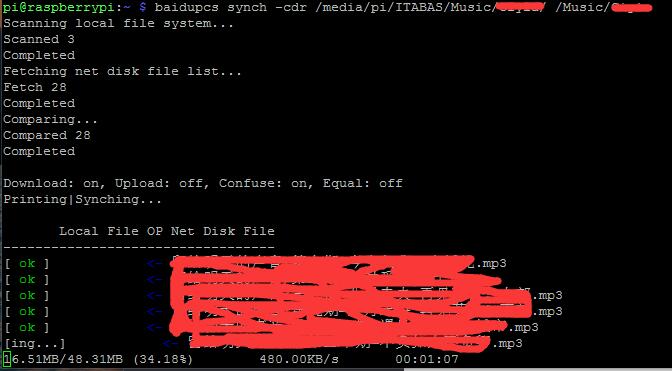
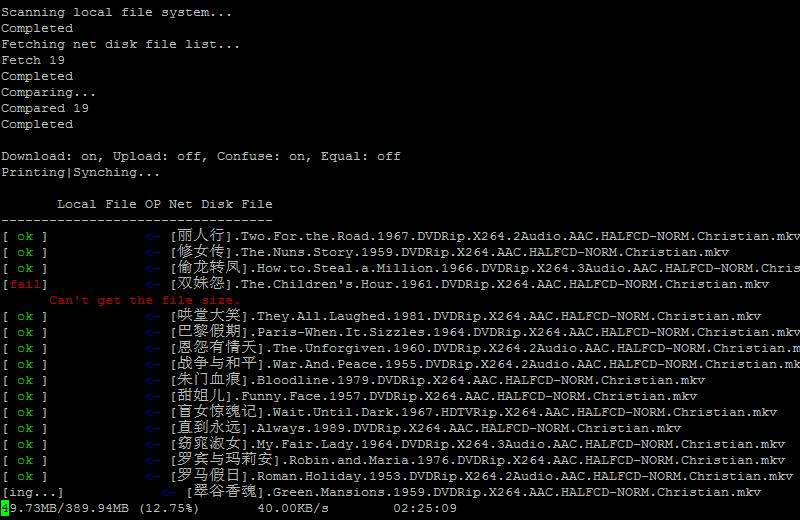
另外还有一个问题没解决,就是在下载单个大文件(size>2G)时会报磁盘空间不足,后面会试着看看能不能解决,下载大文件速度是个问题。 在32位Linux平台上无法下载大文件 #201
Tips:运行时间较长的任务使用tmux或screen命令