Oracle - Advanced Queue & Job
Advanced Queueing Oracle Advanced Queueing (AQ), AQ provides a message queuing infrastructure as integral part of the Oracle server engine. It provides an AP…
Advanced Queueing
Oracle Advanced Queueing (AQ), AQ provides a message queuing infrastructure as integral part of the Oracle server engine. It provides an API for enqueing messages to database queues. These messages can later be dequeued for asynchronous processing.Oracle AQalso provides functionality to preserve, track, document, correlate, and query messages in queues.
How to Implement
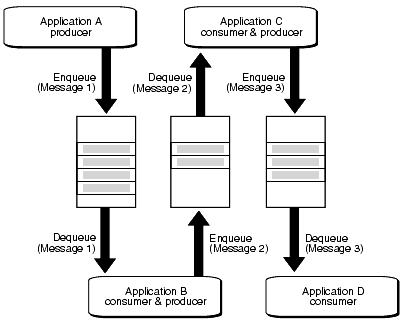
AQ implementation of workflows: A->B->C->D
AQ implementation of Publish/Subscribe:
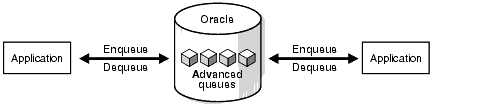
- point-point:
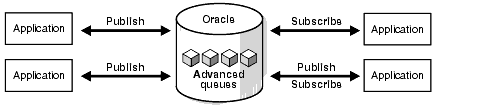
- publish/subscribe:
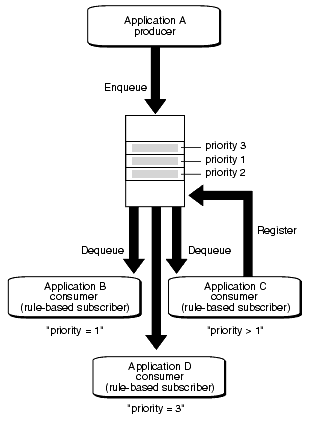
- publish/subscribe with rule:
Related packages
From a
PL/SQLstandpoint,Oracle AQis made available through two packages:DBMS_AQADMandDBMS_AQ. TheDBMS_AQADMpackage is the interface to the administrative tasks of Oracle AQ.
DBMS_AQADMtasks include:
- Creating or dropping queue tables, which contain one or more queues
- Creating, dropping, and altering queues, which are stored in a queue table
Starting and stopping queues in accepting message creation or consumption Most users of the Oracle AQ facility will not work with
DBMS_AQADM. The DBA will most likely initialize all needed queue tables and queues. PL/SQL developers will instead work with theDBMS_AQ.
DBMS_AQtasks include:
- Creating a message to the specified queue
- Consuming a message from the specified queue
AQ Example
Prepare database user
CONN / AS SYSDBA
CREATE USER testq IDENTIFIED BY x;
GRANT connect, resource, dba TO testq;
GRANT aq_administrator_role, aq_user_role  TO testq;
GRANT create type TO testq;
Create a queue
CONN testq/x@ora10gtest
SET SERVEROUTPUT ON

CREATE OR REPLACE TYPE event_msg_type AS OBJECT (
  name            VARCHAR2(10),
  current_status  NUMBER(5),
  next_status     NUMBER(5)
);
/

EXECUTE DBMS_AQADM.create_queue_table( -
   queue_table        =>  'testq.event_queue_tab', -
   queue_payload_type =>  'testq.event_msg_type');

EXECUTE DBMS_AQADM.create_queue( -
   queue_name         =>  'testq.event_queue', -
   queue_table        =>  'testq.event_queue_tab');

EXECUTE DBMS_AQADM.start_queue( -
   queue_name         => 'testq.event_queue', -
   enqueue            => TRUE);
Test Enqueue
DECLARE
  l_enqueue_options    DBMS_AQ.enqueue_options_t;
  l_message_properties DBMS_AQ.message_properties_t;
  l_message_handle     RAW(16);
  l_event_msg          TESTQ.event_msg_type;
BEGIN
  l_event_msg := TESTQ.event_msg_type('REPORTER', 1, 2);
  DBMS_AQ.enqueue(queue_name         => 'testq.event_queue',
                  enqueue_options    => l_enqueue_options,
                  message_properties => l_message_properties,
                  payload            => l_event_msg,
                  msgid              => l_message_handle);
  COMMIT;
END;
/
Test Dequeue
DECLARE
  l_dequeue_options    DBMS_AQ.dequeue_options_t;
  l_message_properties DBMS_AQ.message_properties_t;
  l_message_handle     RAW(16);
  l_event_msg          TESTQ.event_msg_type;
BEGIN
  DBMS_AQ.dequeue(queue_name         => 'testq.event_queue',
                  dequeue_options    => l_dequeue_options,
                  message_properties => l_message_properties,
                  payload            => l_event_msg,
                  msgid              => l_message_handle);
  DBMS_OUTPUT.put_line('Event Name    : ' || l_event_msg.name);
  DBMS_OUTPUT.put_line('Current Status: ' || l_event_msg.current_status);
  DBMS_OUTPUT.put_line('Next Status   : ' || l_event_msg.next_status);
  COMMIT;
END;
/
Job
Overview
Starting with Oracle Database 10g, the Oracle scheduler was greatly improved with the
dbms_schedulerpackage. Replacing thedbms_jobwithdbms_scheduleroffers additional features by adding the ability to tie jobs with specificuser-typeprivileges and roles:
What’s the different
Create job
-- Old using dbms_job scheduler.
VARIABLE l_job NUMBER;
BEGIN
  DBMS_JOB.submit (
    job       => :l_job,
    what      => 'BEGIN NULL; /* Do Nothing */ END;',
    next_date => SYSDATE,
    interval  => 'SYSDATE + 1 /* 1 Day */');

  COMMIT;
END;
/
PRINT l_job

-- New with dbms_scheduler scheduler.
BEGIN
  DBMS_SCHEDULER.create_job (
    job_name        => 'dummy_job',
    job_type        => 'PLSQL_BLOCK',
    job_action      => 'BEGIN NULL; /* Do Nothing */ END;',
    start_date      => SYSTIMESTAMP,
    repeat_interval => 'SYSTIMESTAMP + 1 /* 1 Day */');
END;
/
- Define a meaningful
job_namefor the new job.- Assign a
job_actionofPLSQL_BLOCK.- Use the what value from the old job as the
job_actionvalue in the new job.- Use
SYSTIMESTAMPfor the start_date value.- Use the interval value from the old job as the
repeat_intervalvalue in the new job, making sure the result of the expression is aTIMESTAMPnot aDATE.
Once this conversion has been completed for all jobs, there is freedom from using the old scheduler, so the
job_queue_processesparameter can now be set to zero.
Alter job
-- Old using dbms_job scheduler.
BEGIN
 DBMS_JOB.WHAT(31, 'INSERT INTO employees VALUES (7935, ''TOM'', ''DOGAN'',
   ''tom.dogan@examplecorp.com'', NULL, SYSDATE,''AD_PRES'', NULL,
   NULL, NULL, NULL);',
 COMMIT;
END;
/

-- New with dbms_scheduler scheduler.
BEGIN
 DBMS_SCHEDULER.SET_ATTRIBUTE(
   name          => 'JOB1',
   attribute     => 'job_action',
   value         => 'INSERT INTO employees VALUES (7935, ''TOM'', ''DOGAN'',
      ''tom.dogan@examplecorp.com'', NULL, SYSDATE, ''AD_PRES'', NULL,
      NULL, NULL, NULL);',
END;
/
Remove job from queue
-- Old using dbms_job scheduler.
BEGIN
   DBMS_JOB.REMOVE(14144);
COMMIT;
END;
/

-- New with dbms_scheduler scheduler.
BEGIN
   DBMS_SCHEDULER.DROP_JOB('myjob1');
END;
/
Related tables
DBA_SCHEDULER_SCHEDULES- provides me with information about the schedules that are in effect in the database.DBA_SCHEDULER_PROGRAMS- shows all program objects and their attributes, while viewDBA_SCHEDULER_PROGRAM_ARGSshows all program arguments for programs that have them.DBA_SCHEDULER_JOBS- shows all job objects and their attributes.
Resources:
https://docs.oracle.com/cd/E11882_01/server.112/e11013/aq_intro.htm#ADQUE0100 http://www.orafaq.com/wiki/Advanced_Queueing https://docs.oracle.com/cd/E11882_01/server.112/e25494/scheduse.htm#ADMIN12392 http://www.dba-oracle.com/t_dbms_job_scheduler.htm