Oracle - ASM(Automatic Storage Management)
Oracle ASM is a volume manager and a file system for Oracle database files that supports single-instance Oracle Database and Oracle Real Application Clusters…
Oracle ASMis a volume manager and a file system for Oracle database files that supportssingle-instanceOracle Database andOracle Real Application Clusters(Oracle RAC) configurations.Oracle ASMis Oracle’s recommended storage management solution that provides an alternative to conventional volume managers, file systems, and raw devices.
Oracle ASM uses disk groups to store data files, an Oracle ASM disk group is a collection of disks that Oracle ASM manages as a unit. Within a disk group, Oracle ASM exposes a file system interface for Oracle database files. The content of files that are stored in
a disk groupis evenly distributed to eliminate hot spots and to provide uniform performance across the disks.
Oracle ASM Instances
An
Oracle ASM instanceis built on the same technology as an Oracle Database instance. An Oracle ASM instance has aSystem Global Area(SGA) and background processes that are similar to those of Oracle Database.
However, because Oracle ASM performs fewer tasks than a database, an Oracle ASM SGA is much smaller than a database SGA. In addition, Oracle ASM has a minimal performance effect on a server. Oracle ASM instances mount disk groups to make Oracle ASM files available to database instances; Oracle ASM instances do not mount databases.
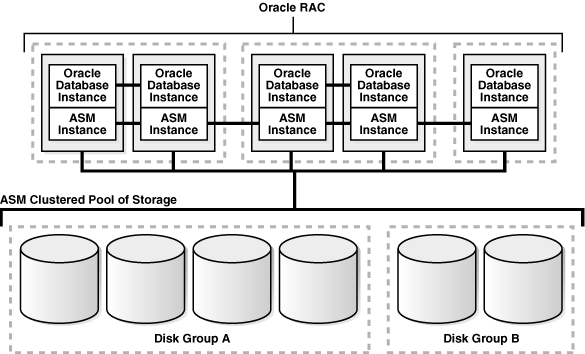
See the below structures: Example - Oracle ASM Cluster with RAC
PS.
Oracle ASM clusterin an OracleRACenvironment where Oracle ASM provides a clustered pool of storage. There is one Oracle ASM instance for each node serving multipleOracle RACorsingle-instancedatabases in the cluster. All of the databases are consolidated and share the same two Oracle ASM disk groups.
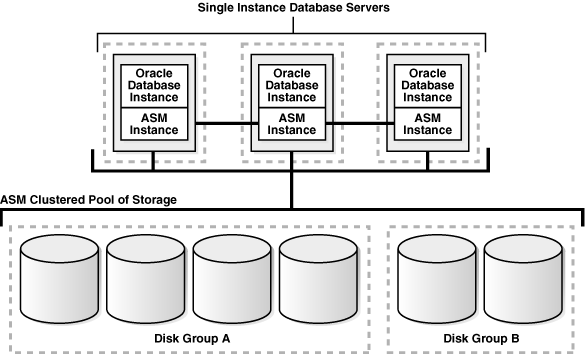
Example - Oracle ASM Cluster with single instance
PS.
A clustered storage poolcan be shared by multiplesingle-instanceOracle Databases. In this case, multiple databases share common disk groups. A shared Oracle ASM storage pool is achieved by using Oracle Clusterware. However, in such environments an Oracle RAC license is not required.
Oracle ASM Disk Groups
A disk groupconsists of multiple disks and is the fundamental object that Oracle ASM manages. Each disk group contains the metadata that is required for the management of space in the disk group. Disk group components include disks, files, and allocation units.
Files are allocated from disk groups. Any Oracle ASM file is completely contained within a single disk group. However, a disk group might contain files belonging to several databases and a single database can use files from multiple disk groups. For most installations you need only a small number of disk groups, usually two, and rarely more than three.
Oracle ASM Disks
Oracle ASM disksare the storage devices that are provisioned to Oracle ASM disk groups. Examples of Oracle ASM disks include:
- A disk or partition from a storage array
- An entire disk or the partitions of a disk
- Logical volumes
- Network-attached files (NFS)
Oracle ASM spreads the files proportionally across all of the disks in the disk group. This allocation pattern maintains every disk at the same capacity level and ensures that all of the disks in a disk group have the same
I/Oload. Because Oracle ASM load balances among all of the disks in a disk group, different Oracle ASM disks should not share the same physical drive.
Oracle ASM Files
Files that are stored in Oracle ASM disk groups are called
Oracle ASM files. Each Oracle ASM file is contained within a single Oracle ASM disk group. Oracle Database communicates with Oracle ASM in terms of files. This is similar to the way Oracle Database uses files on any file system. You can store the various file types in Oracle ASM disk groups.
How to Use ASM
Start & Stop
# start
$ export ORACLE_SID=+ASM
$ sqlplus "/ as sysdba"
SQL> startup
ASM instance started
Total System Global Area   83886080 bytes
Fixed Size                  1217836 bytes
Variable Size              57502420 bytes
ASM Cache                  25165824 bytes
ASM diskgroups mounted

# stop
$ export ORACLE_SID=+ASM
$ sqlplus "/ as sysdba"
SQL> shutdown immediate
Adding a diskgroup
SQL> create diskgroup orag2 external redundancy disk 'ORCL:VOL5';
Diskgroup created.

SQL> select group_number,disk_number,mode_status,name from v$asm_disk;
GROUP_NUMBER DISK_NUMBER MODE_STATUS    NAME
------------ ----------- -------------- -------------------------------------
           0           5 ONLINE
           1           0 ONLINE         VOL1
           1           1 ONLINE         VOL2
           1           2 ONLINE         VOL3
           1           3 ONLINE         VOL4
           2           0 ONLINE         VOL5
6 rows selected.
Recreating a diskgroup
dd if=/dev/zero of=/dev/rdsk/c1t4d0s4 bs=8192 count=12800
# When done, restart ASM and create the diskgroup from scratch.
Rebalancing
# The rebalancing speed is controlled by the ASM_POWER_LIMIT initialization parameter.
# Setting it to 0 will disable disk rebalancing.
# To force rebalancing of a diskgroup:
ALTER DISKGROUP data REBALANCE POWER 11 WAIT;
Coverting to ASM
One can use
Rmanto convert a datafile, tablespace or entire database from/toASM. Here are the steps required to migrate an entire database toASM
Convert a database to ASM
Ensure the database is using an
SPFILEand not aPFILE(it’s about time after all!). Set parameters on the target database. For example, if we set bothDB_CREATE_FILE_DESTandDB_RECOVERY_FILE_DESTwe should get mirrored controlfiles and duplexed log files by default:
SQL> alter system set DB_CREATE_FILE_DEST = '+DATA';
SQL> alter system set DB_RECOVERY_FILE_DEST_SIZE = 17G;
SQL> alter system set DB_RECOVERY_FILE_DEST = '+RECOVER';
SQL> alter system set CONTROL_FILES = '+DATA';
Start the database in
NOMOUNTmode and restore the controlfile into the new location from the old location:
RMAN> connect target /
RMAN> STARTUP NOMOUNT
RMAN> RESTORE CONTROLFILE FROM 'old_control_file_name';
Mount the database and copy the database into the
ASM disk group:
RMAN> ALTER DATABASE MOUNT;
RMAN> CONFIGURE DEVICE TYPE DISK PARALLELISM 8;
RMAN> BACKUP AS COPY DATABASE FORMAT '+DATA';
Switch all datafiles to the new
ASMlocation and open the database:
RMAN> SWITCH DATABASE TO COPY;
RMAN> ALTER DATABASE OPEN;
Add new tempfiles and drop the old tempfiles:
SQL> alter tablespace temp add tempfile;
SQL> alter database tempfile '...' DROP;
SQL> select * from dba_temp_files;
Optionally, move
SPFILEintoASM:
SQL> CREATE SPFILE '+DATA' FROM PFILE;Move redo log files into
ASM- for each group:
SQL> ALTER DATABASE DROP LOGFILE GROUP 1;
SQL> ALTER DATABASE ADD LOGFILE GROUP 1 SIZE 100M;
Convert a tablespace to ASM
Ensure the database in in
archive log mode, and fromrman:
connect target;
sql "alter tablespace TSNAME offline";
backup as copy tablespace TSNAME format '+DATA';
switch tablespace TSNAME to copy;
sql "alter tablespace TSNAME online";
exit;
Convert a datafile to ASM
Ensure the database in in
archive log mode, and fromrman:
connect target;
sql "alter database datafile '...' offline";
backup as copy datafile '...' format '+DATA';
switch datafile '..' to copy;
sql "alter database datafile '...' online";
exit;
Monitoring
V$ASM_DISK -- ASM disks
V$ASM_DISK_STAT -- cached view of V$ASM_DISK for faster access (used by Enterprise Manager)
V$ASM_DISKGROUP -- ASM diskgroups
V$ASM_DISKGROUP_STAT -- cached view of V$ASM_DISKGROUP for faster access (used by Enterprise Manager)
V$ASM_OPERATION -- status of ongoing disk operations (like rebalancing)
Resources: https://docs.oracle.com/cd/E11882_01/server.112/e18951/asmcon.htm#OSTMG94057 http://www.orafaq.com/wiki/Automatic_Storage_Management