Use Keepalived Switching Master-Slave Solution
Keepalived Overview Keepalived is a lightweight and high availability framework solution in Linux, It is seem as HeartBeat, RoseHA, has similar function that…
Keepalived Overview
Keepalived is a lightweight and high availability framework solution in Linux, It is seem as
HeartBeat,RoseHA, has similar function that implement the service and the high availability of the network, but there are difference that HeartBeat is very professional and functional, but the deployment is very complex.
So Compare with HeartBeat, Keepalived is mainly through the virtual routing redundancy protocol(VRRP) to achive high availability, and the installation and configuraion is very simple.
Keepalived has three modules, core, check and vrrp
Install Keepalived
you can download the latest verion in the offical site: http://www.keepalived.org, Currently, the latest version is
1.3.2. the other way, just install byyumorapt-get
# download&unpack
yum install openssl-devel
cd /tmp
wget http://www.keepalived.org/software/keepalived-1.3.2.tar.gz
tar xzf keepalived-1.3.2.tar.gz

# make&make install
cd keepalived-1.3.2
./configure
make && make install

# copy configuration file
cp /usr/local/etc/rc.d/init.d/keepalived /etc/init.d/
cp /usr/local/etc/sysconfig/keepalived /etc/sysconfig/

# chmod&chkconfig
chmod +x /etc/init.d/keepalived
chkconfig --add keepalived
chkconfig keepalived on

mkdir /etc/keepalived
ln -s /usr/local/sbin/keepalived /usr/sbin/

# simple way to install stable version
yum install -y keepalived

# maybe add firewall rule
iptables -I INPUT -i eth0 -d 192.168.193.0/8 -p vrrp -j ACCEPT
iptables -I OUTPUT -o eth0 -d 192.168.193.0/8 -p vrrp -j ACCEPT
service iptables save

# use
service keepalived start
service keepalived reload
Keepalived sketch
                   +-------------+
                   |    router   |
                   +-------------+
                          |
                          +
    MASTER            keepalived          BACKUP
192.168.193.225    192.168.193.202    192.168.193.226
+-------------+    +-------------+    +-------------+
| instance01  |----|  virtualIP  |----|  instance02 |
+-------------+    +-------------+    +-------------+
                          |
       +------------------+------------------+
       |                  |                  |
+-------------+    +-------------+    +-------------+
|    web01    |    |    web02    |    |    web03    |
+-------------+    +-------------+    +-------------+
Keepalived + Nginx
Monitor Nginx
Check the nginx status, when the process is not working try to start nginx, if it fail then stop keepalived.
#!/bin/bash
#/etc/keepalived/check_nginx.sh
counter=$(ps -C nginx --no-heading|wc -l)
if [ "${counter}" = "0" ]; then
    /usr/local/bin/nginx
    sleep 2
    counter=$(ps -C nginx --no-heading|wc -l)
    if [ "${counter}" = "0" ]; then
        /etc/init.d/keepalived stop
    fi
fi
Configure keepalived
! Configuration File for keepalived

global_defs {
    notification_email {
        admin@example.com
    }
    notification_email_from daily_notice@example.com
    smtp_server mail.example.com
    smtp_connect_timeout 30
    router_id LVS_DEVEL
}
vrrp_script chk_nginx {
	# execute instance service script
    script "/etc/keepalived/check_nginx.sh"
    interval 2
    weight -5
    fall 3
    rise 2
}
vrrp_instance VI_1 {
	# state: MASTER|BACKUP
    state MASTER
    interface eth0
    # instance ip addr
    mcast_src_ip 192.168.193.225
    virtual_router_id 51
    # priority: MASTER > BACKUP
    priority 101
    advert_int 2
    authentication {
        auth_type PASS
        auth_pass 1111
    }
    virtual_ipaddress {
        192.168.193.202
    }
    track_script {
    	# configure monitor module
        chk_nginx
    }
}
Test & Result
please check the server message from
/var/log/messages
Keepalived + HAProxy
Baisclly it is seem as nginx configuration, show the below sketck and monitor script:
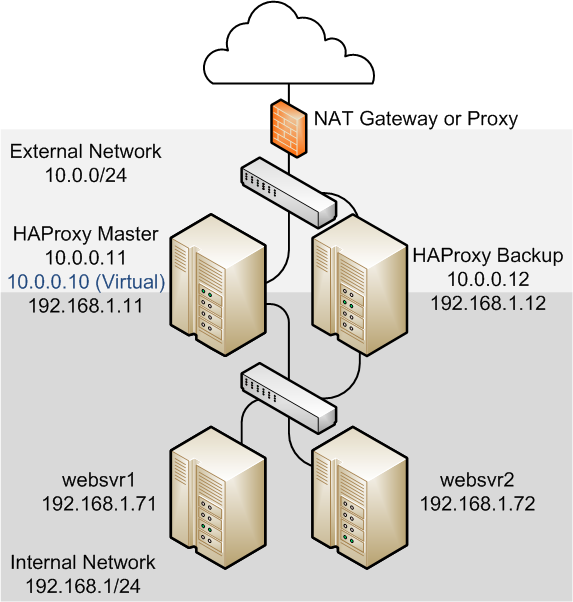
HAProxy configuration
# /etc/haproxy.conf
global
    daemon
    log 127.0.0.1 local0 debug
    maxconn 50000
    nbproc 1

defaults
    mode http
    timeout connect 5s
    timeout client 25s
    timeout server 25s
    timeout queue 10s

# Handle Incoming HTTP Connection Requests on the virtual IP address controlled by Keepalived
listen  http-incoming
    mode http
    bind 192.168.193.202:80
# Use each server in turn, according to its weight value
    balance roundrobin
# Verify that service is available
    option httpchk OPTIONS * HTTP/1.1\r\nHost:\ www
# Insert X-Forwarded-For header
    option forwardfor
# Define the back-end servers, which can handle up to 512 concurrent connections each
    server websvr1 192.168.193.225:80 weight 1 maxconn 512 check
    server websvr2 192.168.193.226:80 weight 1 maxconn 512 check
And the keepalived configuration is same as the previous profile.
Keepalived + Redis
Currently, use the Redis Sentinel completely solved the master failover incident, but also use the Keepalived to solve the switching master-slave.
First, we should write some scripts to monitor redis status:
Redis scripts
check redis server is alive
#!/bin/bash
###/etc/keepalived/scripts/redis_check.sh
ALIVE=`/usr/bin/redis-cli PING`
if [ "$ALIVE" == "PONG" ]; then
  echo $ALIVE
  exit 0
else
  echo $ALIVE
  exit 1
fi
check redis server switching master
#!/bin/bash
###/etc/keepalived/scripts/redis_master.sh
REDISCLI="redis-cli"
LOGFILE="/etc/keepalived/log/redis-state.log"
pid=$$

echo "`date +'%Y-%m-%d:%H:%M:%S'`|$pid|state:[slaver]" >> $LOGFILE
echo "`date +'%Y-%m-%d:%H:%M:%S'`|$pid|state:[slaver] Run 'SLAVEOF 10.20.112.27 6379'" >> $LOGFILE
$REDISCLI SLAVEOF 10.20.112.27 6379 >> $LOGFILE  2>&1
echo "`date +'%Y-%m-%d:%H:%M:%S'`|$pid|state:[slaver] wait 10 sec for data sync from old master" >> $LOGFILE
sleep 10
echo "`date +'%Y-%m-%d:%H:%M:%S'`|$pid|state:[slaver] data rsync from old mater ok..." >> $LOGFILE
echo "`date +'%Y-%m-%d:%H:%M:%S'`|$pid|state:[master] Run slaveof no one,close master/slave" >> $LOGFILE
$REDISCLI SLAVEOF NO ONE >> $LOGFILE 2>&1
echo "`date +'%Y-%m-%d:%H:%M:%S'`|$pid|state:[master] wait other slave connect...." >> $LOGFILE
redis backup script from master before failover
#!/bin/bash
###/etc/keepalived/scripts/redis_backup.sh
###/etc/keepalived/scripts/redis_fault.sh
###/etc/keepalived/scripts/redis_stop.sh
REDISCLI="redis-cli"
LOGFILE="/etc/keepalived/log/redis-state.log"
pid=$$

echo "`date +'%Y-%m-%d:%H:%M:%S'`|$pid|state:[master]" >> $LOGFILE
echo "`date +'%Y-%m-%d:%H:%M:%S'`|$pid|state:[master] Being slave state..." >> $LOGFILE 2>&1
echo "`date +'%Y-%m-%d:%H:%M:%S'`|$pid|state:[master] wait 10 sec for data sync from old master" >> $LOGFILE
sleep 10
echo "`date +'%Y-%m-%d:%H:%M:%S'`|$pid|state:[master] data rsync from old mater ok..." >> $LOGFILE
echo "`date +'%Y-%m-%d:%H:%M:%S'`|$pid|state:[slaver] Run 'SLAVEOF 10.20.112.27 6379'" >> $LOGFILE
$REDISCLI SLAVEOF 10.20.112.27 6379 >> $LOGFILE  2>&1
echo "`date +'%Y-%m-%d:%H:%M:%S'`|$pid|state:[slaver] slave connect to 10.20.112.27 ok..." >> $LOGFILE
Configure Keepalived
global_defs {
    notification_email {
        admin@example.com
    }
    notification_email_from daily_notice@example.com
    smtp_server mail.example.com
    smtp_connect_timeout 30
    router_id LVS_DEVEL
}
vrrp_script chk_redis {
        script "/etc/keepalived/scripts/redis_check.sh"
        weight -20
        interval 2
}

vrrp_instance VI_1 {
        state backup
        interface eth0
        virtual_router_id 51
        nopreempt
        priority 200
        advert_int 5
        track_script {
            chk_redis
        }
        virtual_ipaddress {
             192.168.193.202
        }
        notify_master /etc/keepalived/scripts/redis_master.sh
        notify_backup /etc/keepalived/scripts/redis_backup.sh
        notify_fault  /etc/keepalived/scripts/redis_fault.sh
        notify_stop   /etc/keepalived/scripts/redis_stop.sh
}
And the detail information please check the below resoures —>
Resources: https://docs.oracle.com/cd/E37670_01/E41138/html/section_sm3_svy_4r.html http://seanlook.com/2015/05/18/nginx-keepalived-ha/ https://www.centos.bz/2012/02/nginx-keepalived-high-availability/ https://my.oschina.net/guol/blog/182491